

Zero Retries is an independent newsletter promoting technological innovation in and adjacent to Amateur Radio, and Amateur Radio as (literally) a license to experiment with and learn about radio technology. Radios are computers - with antennas! Now in its sixth year of publication, with 3700+ subscribers.
Steve Stroh N8GNJ, Editor
Tina Stroh KD7WSF, Business / Conference Manager
Substack says this issue will be truncated by some email clients.
Thus, it’s easier to read in a web browser:
https://www.zeroretries.org/p/zero-retries-0268.
It’s easy and free (choose the free option) to subscribe
to receive your own copy of Zero Retries every week via email:
In This Issue:
Kantronics KPC-3XE USB Unveiled
Pi Image Manager: Back Up a Running Raspberry Pi Without Shutting Down Your Ham Shack
Olimex UEXT-CH390 SPI to Ethernet module targets Raspberry Pi and ESP32 MCU boards running ESPHome
VARA product updates, 4 Nov 2026 (Vara FM v4.4.1, Vara HF v4.9.1 & others)
Using Inexpensive Portable Radios For Data Communications Experimentation
Founding Members Who Generously Support Zero Retries
Comments on This Issue (Redirects to Comments Page)
I-Frame
By Steve Stroh N8GNJ
Brief notes about this issue of Zero Retries.
Founding Members and Paid Subscribers Update
Optional Paid Subscriptions, and especially Founding Member subscriptions to Zero Retries not only help offset various expenses incurred in publishing Zero Retries, but were are a significant portion of the “seed capital” we needed to host Zero Retries Digital Conference (ZRDC) 2026, and future ZRDCs. Thank You!
Our thanks to Prefers To Remain Anonymous 54 for renewing as an Annual Paid Subscriber (3rd year!) to Zero Retries this past week!
Our thanks to Prefers To Remain Anonymous 144 for upgrading from a free subscriber to Zero Retries to an Annual Paid Subscriber this past week!
Our thanks to Prefers to Remain Anonymous 145 for becoming a Paid Subscriber to Zero Retries this past week! PTRA 145’s Paid Subscription was a gift subscription from Prefers To Remain Anonymous 121, so our thanks also to PRTA 121.
Financial support from Zero Retries readers is a significant vote of support for the continued publication of Zero Retries.
Please direct comments / feedback about I-Frame to the Zero Retries email list with the hashtag #ZR0268. Paid subscribers can comment directly on the web version of this issue.
The Reality of Getting Potential NewTechHams Interested in Amateur Radio is That AR Must Meet Them On Their Preferred Network - Meshtastic and MeshCore
By Steve Stroh N8GNJ
Ultimately, amateur radio must prove that it is useful for society.
Dr. Karl Meinzer DJ4ZC.
The Universal Purpose of Ham Radio is to have fun messing around with radios.
Bob Witte K0NR
Meshtastic and MeshCore on Amateur Radio spectrum isn’t the most interesting or important use of those technologies. If Amateur Radio wants to continue to be relevant to society, it’s incumbent for Amateur Radio Operators (and clubs, and networks, and organizations) to reach out into Meshtastic and MeshCore networks operating on unlicensed spectrum and engage, peer to peer, with those radio experimenters.
Folks of my generation remember how much fun, and how formative it was to experience CB (Citizens Band) radio, and how it was a gateway into having even more fun experimenting with the many more things that are possible with Amateur Radio. But without that gateway, many of us may not have ever discovered Amateur Radio, or discovered it too late to be interesting.
That was true then, and it’s 10x true now that Amateur Radio is fading out of societal perception, or at best “Ham Radio… Oh, is that still a thing?”.
More commonly… “What the heck is Ham Radio?”.
An email from my old friend Steve Monsey N0FPF today:
Meshcore is really advancing in the PNW (Pacific Northwest)
Man, Meshcore here is really happening. Now they have MeshMedia and a bunch of apps.
https://cascadiamesh.org/mediamesh-flasher/
Best if viewed on a PC.
Seems to be mostly done by a person named Jade. I’ve chatted with them in Discord. Wow, the amount of programming they have done - and fast!
Game!
Set!!
Match!!!
Click on the prominent Get Started! tab in the upper right corner, and you’re redirected to this welcoming page and message:
Hi! If you’re here it’s likely that you saw, heard or read about mesh networks, MeshCore or the CascadiaMesh. Perhaps someone gave you a MeshCore companion or standalone device as a present or to stay in touch with a group or team. This page will help you get it set up and talking on the mesh in no time!
Note that there’s not a gray hair in the accompanying photo.
The page is welcoming, there’s nothing intimidating (like a warning about transmitting without a license), and there’s no unnecessary jargon.
Another enticing thing about the page is that there are a lot of interesting-looking links such as I-5 Project and Events (all of which sound really exciting).
Thus… as much as I’m joyfully reporting lots of progress on Technological Innovation in Amateur Radio in this and earlier issues of Zero Retries… just a glance at the page that N0FPF cited… you quickly get the message that in comparison, Amateur Radio just feels old and tired and way behind the times. Mesh is where the action is.
Put it this way… Other than HamWAN and a smattering of AREDN, I can’t cite anything that’s Zero Retries Interesting happening in Amateur Radio in the Seattle, Washington area. Compare for yourself - Mike & Key, Puget Sound Repeater Group, MicroHAMS, Western Washington Amateur Television Society, Cascade Radio Club… you get the picture. I’m not picking on any of these great organizations… but the contrast between those web pages and Cascadia Mesh’s web page is just stark!
In contrast… Cascadia Mesh (centered in the Seattle area) is exploding.
You can feel like you’d be getting involved with something that’s really exciting and lively!
Thus, get thee on (unlicensed spectrum) Meshtastic or MeshCore. Or both. Play amongst the digital natives you’ll find there. You’ll probably have an amazing amount of fun. I’m really gonna try to take my own advice here.
Side Discussion 1 - Both?
I keep being ping-ponged about Meshtastic versus MeshCore. Us Amateur Radio Operators, and survivors of the great “packet radio digipeater / node wars” have a mantra pounded into our brains “thou shalt not put user traffic and network traffic on the same frequency”. Thus we kind-of reflexively prefer MeshCore for its structured nature - a repeater is a repeater, and a node is not a repeater.
But… Meshtastic has its rabid adherents. They don’t want “structure” - as in infrastructure. Infrastructure is “fixed” and can go away (or be taken over) or otherwise becomes relied upon too heavily. Better to have a completely decentralized system that has no central points of failure (or capture).
They have a point.
So, yes, both. Hopefully on different frequencies.
Side Discussion 2 - There’s Now GMRS
General Mobile Radio Service (GMRS) in the US has become a bridge between CB and Amateur Radio. Consumer radio manufacturers have embraced GMRS and are actively marketing it to user communities like off-road vehicles and many others with “communications other than cell” is important. Unlike CB, GMRS features repeaters and reasonable transmit power, and use of more reasonable, reliable spectrum on UHF.
Like CB, while there is in the US a license requirement (but not in enlightened Canada and Australia), there is no test required or other Amateur Radio baggage. You just get your license, buy a radio, and find a nice repeater and start listening and participating. It’s “just folks” on GMRS.
So GMRS is a place to participate with radio experimenters that “mostly just like to talk” and maybe, potentially, find some prospective NewTechHams.
Please direct comments / feedback about this article to the Zero Retries email list with the hashtag #ZR0268. Paid subscribers can comment directly on the web version of this issue.
Mesh OFDM Protocol (MOP)
By Steve Stroh N8GNJ
Here we (I) go down another rabbit hole discovered late in the editing process. MOP was formerly Mesh Operations Protocol, and is a project by Stefaan Desmedt KO6IKR. I (well, actually, Tina) pinged KO6KIR earlier in the year about presenting at ZRDC 2026 and he said that early to mid-year is the “busy time in his industry”.
But as background for the above story to illustrate an engaging website for an Amateur Radio data communications project, I was going to cite MOP.
Apparently busy season in K06KIR’s industry is past, as he has been busy on the website and making considerable progress on MOP, and now he’s very actively embracing OFDM modulation, putting it in the name of the project. One of KO6KIR’s frustrations in earlier implementations of MOP was trying to integrate VARA… which predictably, didn’t work too well for a system that prioritizes short packets. Perhaps xara? But I digress.
MOP is a complete digital messaging network for FM: its own high-speed modem, a mesh that builds itself, and delivery you can trust, on the radio you already own. No internet, no repeater, and no central station needed.
Short bursts, not phone calls
Most digital modes on FM work like a telephone call: connect, shake hands, send, wait, disconnect. That’s fine for one long email to one gateway. For a short message it means seconds of setup before the first word goes out, and while that call is running, everyone else on the frequency waits. MOP works the way radio is at its best: like a broadcast.
📞 Session modes
Connect → handshake → send → wait → disconnect. One station talks to one station; the rest of the frequency waits. Often built around a gateway or a central server, so when that is unreachable, everything stops.
📡 MOP
Key up → send one short burst → done. A short message is on the air for about a second. Everyone in range hears it, any MOP station can pass it on, and there is no center: if one station goes off the air, the mesh simply goes around it.
Think of text messaging on a phone, except the cell towers are the MOP stations themselves. You pick a callsign, type, and press Enter. MOP finds the way: straight to the other station if it can hear you, or hopping through other MOP stations if it can’t. When the message arrives, the other station confirms it and you see ✓ delivered, even when it took three hops to get there. If the other station is switched off, your message waits and goes out by itself the moment they’re back on the air.
Every MOP station sends a short beacon now and then: “I’m here, this is where I am, and these are the stations I can hear.” From those beacons, and from everything else it hears, every MOP station learns the map of who can reach whom. That map is the mesh, and it repairs itself when stations come and go.
NORTH AMERICA LOS ANGELES AREA NEW YORK AREA internet link between gateways · coming next📻You📻Glendale📡Mt. Wilson📻Long Beach🌐LA gateway🌐NY gateway📡Bear Mtn.📻Brooklyn📻Newark
📡 Beacons✉️ Message via relay⏸ Station off the air🚨 Emergency🌎 Coast to coast (coming next)
From the beacons, every station now knows the mesh: who hears whom (green lines). You can’t hear Long Beach directly, but you know Mt. Wilson can.
There are many, many more salient points on the linked page in the title, and most of the graphics on the page are animations, so I can’t copy them here.
I can’t argue against any of KO6KIR’s conclusions / decisions / features. We do need something like MOP and he’s developed good answers to a lot of issues / problems in Amateur Radio data communications, especially for his use case of emergency communications data communications.
I think that MOP, like VARA / xara, and soon IP400 will popularize “the use your own VHF / UHF radio” use case, especially if you get one with flat audio for better performance.
Be sure to check out 14 Where MOP is going
Lastly:
MOP is beta software, still in development. Things will change, and some may not work yet. Please report anything odd.
I’m looking for people in the Los Angeles area to help test it on the air. Interested? Email me at KO6IKR@gmail.com. 73 de KO6IKR
If I were in the Los Angeles area (which is larger than some states) I’d be participating in this testing!
Please direct comments / feedback about this article to the Zero Retries email list with the hashtag #ZR0268. Paid subscribers can comment directly on the web version of this issue.
Kantronics KPC-3XE USB Unveiled
By Steve Stroh N8GNJ
With all the hoopla about new types of TNCs such as the OpenTNC, it’s easy to forget about legacy vendors of TNCs such as Kantronics. This week I received an email from Kantronics about their new KPC-3XE USB TNC.
Email from Kantronics - Meet the Kantronics KPC-3XE: the next generation of TNC:
For years, the KPC-3+ has been the TNC hams count on. It runs APRS digipeaters on hilltops, sits in EOC go-kits, and has passed packet traffic through storms, blackouts, and Field Days.
Today we’re proud to introduce its successor: the Kantronics KPC-3XE USB.
On the outside, it’s the KPC-3+ you know: the same compact 5.2” × 5.2” footprint, the same DB-9 radio port, and the same familiar command set. Inside, it’s a new generation. It runs on the faster 16-bit 9S12XE processor that powers our 9612XE.
What’s new in the KPC-3XE
Flash firmware, no more EPROM swaps. To update, you set one internal jumper to enter BIOS loading mode. Then you load the new firmware from any terminal program that can send an ASCII text file. There are no chips to order, pull, or replace.
1 MB of RAM, double the KPC-3+. That gives you more room for PBBS mail and messages, which matters when your mailbox is the one holding traffic for the net.
Real-time clock, now standard. It used to be an extra-cost option on the KPC-3+. Now it comes in every unit.
FX.25 forward error correction. FX.25 adds error detection and correction on top of AX.25 when you connect with other FX.25 stations. On marginal paths and noisy channels, more of your packets get through the first time.
Plug-and-play USB. It connects straight to a modern laptop. You no longer need a USB-to-serial adapter or have to hunt down an old PC with a DB-25 port. A USB A-to-B cable is included.
Reverse-polarity protection. The power input is now protected against a backwards hookup in the field.
The KPC-3XE handles keyboard-to-keyboard packet, digipeating, a personal mailbox with forwarding, and KA-Node and K-Net™ networking. It also covers APRS® and GPS tracking with an NMEA-0183 receiver, KISS mode for your favorite packet software, EMWIN weather, and remote control and telemetry through two A/D inputs and two control outputs.
Why upgrade now?
The KPC-3+ was officially discontinued in 2026. The KPC-3XE is its direct replacement.
Older KPC-3, KPC-2, and KPC-1 owners: those units are no longer supported. This is the modern, supported way to keep your station on the air.
It costs less. The KPC-3XE is $249, which is $40 less than the KPC-3+ RS232.
Whether you’re replacing a legacy KPC, building out a remote digi, or finally adding packet to your emergency kit, the KPC-3XE is ready to go to work. Every unit is built and tested in Kansas and ships ready to connect, with a USB cable and power plug in the box.
It’s good to see that Kantronics is “back in the game” with an updated version of the venerable KPC-3+ with features such as “No ROM Swap Needed” firmware upgrades, 1 MB of RAM that can be used by the built-in Packet Bulletin Board System, Real Time Clock with battery backup, and most impressively, FX.25 Forward Error Correction.
Other factors that should be taken into account when considering Kantronics:
They manufacture at scale and thus this unit will remain available (not built in batches and only available periodically).
Kantronics units have a 1-year warranty.
Kantronics offers technical support.
Kantronics provides a comprehensive reference manual. That is sorely needed by other TNC units.
Kantronics units have a long history and thus they’ve worked out the “worst of the bugs”, both hardware and software. Many, perhaps most APRS digipeaters in use on remote sites use Kantronics KPC-3 / KPC-3+ units, and they work very reliably as standalone units.
One thing that Kantronics deserves credit for, and is often forgotten, is that over the decades, they have continued to incrementally improve their firmware and capabilities. Thus there are features “already in there” waiting to be used, such as AX.25 v2.2 (formerly called AX.25 Level 2 Version 2), and K-NET - Kantronics’ implementation of NET/ROM Packet Radio Mesh Networking.
I was so impressed with the KPC-3XE that I ordered one and I’m looking forward to doing some A/B testing between it and my new NA6D OpenTNCs, especially testing the interoperability of FX.25 Forward Error Correction.
I normally order Amateur Radio units from retailers, and was hoping to give some business to Gigaparts for their sponsorship of ZRDC 2025 and 2026. But, Gigaparts isn’t a Kantronics dealer. I then went to Ham Radio Outlet, but while they do carry the KPC-3XE, they don’t carry the radio cable I wanted1. Thus to minimize shipping hassles, I ordered both the KPC-3XE and the cable directly from Kantronics.
Please direct comments / feedback about this article to the Zero Retries email list with the hashtag #ZR0268. Paid subscribers can comment directly on the web version of this issue.
Packet Radio?
By Steve Stroh N8GNJ
At the rate Amateur Radio data communications is advancing, we might have to start rethinking our terminology - what is Packet Radio these days?
Not too long ago I had a long running discussion with a long time packet radio user who had an issue with me referring to VARA as “advanced packet radio”, and especially my references to “legacy packet radio”. Their opinion was that VARA was a completely separate “thing” - not equivalent (or an improvement) to packet radio at all. When our discussions came to a conclusion, my correspondent’s view was, essentially, “packet radio is what I can do with my current packet radio equipment - basically AX.25 at 1200 bps on VHF / UHF and 300 bps on HF.
My main point was that AX.25 packet radio on HF at 300 bps AFSK was at best a terrible hack, the best we could do for HF communications at the dawn of the packet radio era. Unlike RTTY, at least there was a rudimentary form of error correction on AX.25 packet radio. Every issue we had with “HF” packet radio (AX.25 using 300 bps AFSK) was not just fixed, but vastly superior in VARA HF. We agreed to disagree 😀.
But as we began seeing in 2025, and is now a full-blown trend in 2026, we’re going to have to start rethinking our inherent assumptions when we utter the phrase “Packet Radio”. While AX.25 (and especially the most advanced implementations - version 2.2) has withstood the test of time, the 1200 bps Audio Frequency Shift Keying (AFSK) modulation / waveform is pretty archaic by modern standards.
A Mini Primer on 1200 bps From “The Olden Days”
1200 bps AFSK wasn’t chosen because it was good… it was chosen because:
A group (I’ve forgotten who) found a bunch of surplus telephone company “Bell 202” (1200 bps) landline modems and decided to connect them to radios. If memory serves, that experiment predates packet radio.
That experiment went pretty well. The two tones used in Bell 202 - 1200 Hz and 2200 Hz passed through the voice pre-emphasis / de-emphasis stages in typical VHF / UHF FM radios using speaker and microphone connections.
It was reasonably easy to build “Bell 202” equivalent modems into early packet radio gear using inexpensive chips and components.
When packet radio was getting started, 1200 bps was rip-roaring fast compared to 300 bps (yes, there was a time…) landline modems. Amateur Radio was (briefly) smug that packet radio was providing a superior experience using landline modems.
Every (clone of the TAPR TNC-2) packet radio TNC replicated the use of that 1200 bps modem circuitry. It worked, and the curse of the network effect struck. If you had a TNC that offered some other speed… 2400, 4800, 9600, even 19200, and ultimately 56k… who (few) would you be able to communicate with?
In subsequent decades, APRS was established and 1200 bps was adequate for that use. In truth, the “frugality of bits” used by APRS was optimized for 1200 bps and 1200 bps digipeaters.
Then came countless widgets for APRS use such as TNCs embedded into radios, transmit-only tracker units, all of which used 1200 bps AFSK.
Fast Forward to the Mid 2020s
In the mid-2020s, Amateur Radio technology has evolved to the point that the “modulator” portion of an Amateur Radio data communications system is literally, whatever we want. It’s just software throwing carefully formatted bits at the audio interface. Realistically, the only (minor) constraint on data communications in Amateur Radio is confining the modulation into a 12.5 kHz channel2 on VHF / UHF bands.
But now in 2026, we’re going to have to start rethinking the definition of packet radio. We now have some interesting options to using 1200 bps AFSK:
LoRa is getting a lot of usage for APRS, including digipeaters,
Mercury modem for HF,
Modem73 (for HF / VHF / UHF),
xara for HF (and VHF / UHF),
And, I’m told, there’s some work continuing on Amateur Radio Digital Open Protocol (ARDOP).
I say that those are options, not entirely new modes because what they have in common is that they’re just “transport”. They’re the equivalent of using FTP - File Transfer Protocol. They all just “move the bits” and depend on host software to “tell them what to do”.
This is amply demonstrated by the work that Craig Lamparter KM6LYW has done in experimentally implementing them in DigiPi. Before those options, DigiPi had been a fairly conventional Amateur Radio data communications “appliance”3. But being software-based (and KM6LYW being a very capable software developer), KM6LYW has implemented Mercury, Modem73, and xara… and all of them “just work”. Thus DigiPi to DigiPi, you can choose the most effective transport, depending on the capabilities of the station you want to connect to.
Another example of changing options for transport is that using 9600 has finally become practical when you have the option of a radio that has a flat audio connection. 9600 has a reputation of being “fussy”. It generally works between units of the same type, notably Kenwood TM-D700, TM-D710, and probably the new TM-D750 as Kenwood does a great job of matching the 9600 modem to the radio. But trying to communicate at 9600 to a radio that’s using a 9600 bps TNC has generally been problematic. But what has changed is the implementation of Forward Error Correction (FEC) that can correct received errors without requiring a retransmission (and thus negating the speed advantage of 9600 bps). The NinoTNC implements 9600 bps and IL2P FEC. The OpenTNC implements 9600 bps and FX.25 FEC (and support for IL2P is hinted). The Dire Wolf Software TNC supports 9600 bps and both FX.25 and IL2P. Thus 9600 is practical, finally!
But… the “AX.25” specification, and thus legacy packet radio TNCs are not compatible with FX.25 or IL2P, unless used in KISS mode and a software on a host such as Dire Wolf. And there’s no provision, to date, in radios with TNCs, or NinoTNC, or OpenTNC, or Dire Wolf, for these brand-new modulations - Mercury modem, Modem73, or xara. Or, especially, LoRa.
We Need a Real Data Radio
Thus in the coming years, we really need something like the UDRX-440 as envisioned by Northwest Digital Radio:

A basic radio with wideband audio, under full software control. No fancy display needed (though it would be a nice option). The radio should have a big heatsink for high duty cycle digital operation, with enough room inside the radio for either a full size Raspberry Pi 5 or at minimum a Raspberry Pi 5 Compute Module, and additional room for an audio interface (either via USB, or a Raspberry Pi HAT).
All of the heavy lifting is done with the Raspberry Pi coupled to a high bandwidth audio interface such as those being offered by AllScan.info and Masters Communications DRA series.
Frankly… for us “digital first” folks, such a data radio is what the $1000+ Kenwood TM-D750 should have been.
Within a couple of months, I’ll have converted all of my TM-V71A radios in N8GNJ / Zero Retries Labs to a lash-up of the above:
TM-V71A
Raspberry Pi 5 with at least 4 GB RAM
Specific audio interface to be determined
Each one will have a unique IPv4 (44Net) address.
2027 is going to be a lot of fun for those of us who like to experiment with Amateur Radio data communications.
Please direct comments / feedback about this article to the Zero Retries email list with the hashtag #ZR0268. Paid subscribers can comment directly on the web version of this issue.
ZR > BEACON
By Steve Stroh N8GNJ
Short mentions of Zero Retries Interesting items.
For Packet Users Everywhere
Glenn Allison N3MEL on the Packet-Radio-RF-Forwarding email list:
To make this month’s PKTNET more interactive for all packet users—whether on Eastnet, Net105, TPRFN or others—please see the instructions below. The goal is to demonstrate how interconnected and robust these groups and systems are across the US and worldwide.
I have created an interactive check-in process through the Application Services on my node. You can view your check-in in real time on the live webpage here: https://www.tprfn.net/pktnet-info
Moving forward, the intent is to make select TPRFN forms available directly over the packet network rather than just via the internet. Starting this winter, we plan to roll out the ICS-213, Field Situation, Skywarn, and Packet Bulletin forms. These forms will work the same way your net check-in does now.
I hope this encourages more packet users to participate. This is not a VARA-dependent net; it is for packet enthusiasts everywhere!
The next net is scheduled for Sunday, November 15th, but you are welcome to test this method over the coming weeks.PLEASE FEEL FREE TO SHARE WITHIN YOUR CLUBS OR GROUPS!
Instructions:Welcome to the PKTNET Interactive Check-In Port on the Packet Radio RF Forwarding Network.
Follow these steps to connect, complete your check-in, and update your station profile.
Step 1: Connection Options for N3MEL-5 Interactive Port You can access the PKTNET interactive check-in port through any of the following connection methods:
Node Stack Connection: Connect to your node stack (however you access it) to connect directly to N3MEL-5, or alternatively connect to N3MEL-7 and issue the apps command.
HF Radio (VARA & ARDOP): Connect direct via RF to N3MEL-5 on 7.1032 MHz (daytime) or 3.596 MHz (nights).
VHF FM Radio (VARA FM): Connect direct via RF to N3MEL-5 on 145.670 MHz.
VHF Packet (AX.25 1200 baud): Connect direct via RF to N3MEL-5 on 145.050 MHz.
Telnet: Connect via IP at n3mel.ddns.net:8015 select the Terminal Tab then enter (Username: your callsign, Password: n3melnode). In the lower type ahead box enter “apps” <enter>. It will ask for you callsign this is for local logging only, then from the menu selection use #4 <enter> and follow prompts to check-in.
Feel free to check-in via the other modes (but only check-in once per mode)
Step 2: Enter Your Callsign When prompted by the welcome banner:
Enter your amateur radio Callsign (e.g., N3MEL).
Step 3: Review or Update Your Station Profile
Returning Stations: If your callsign is already saved in the station database (pktnet_master.json), the system will display your stored details (Name, Town, State, and 6-character Maidenhead Grid).
You can select fields [1] through [4] to correct any outdated information.
Once verified, select [5] to proceed to operating modes.
New Stations: If this is your first time checking in, the system will prompt you to enter your:
6-character Maidenhead Grid square (e.g., FM29dx)
Operator Name
Town
State
Step 4: Select Your Operating Mode Choose your primary operating mode for the session by entering the corresponding number:
[1] AXIP
[2] AX25 VHF/UHF
[3] AX25 HF
[4] VARA HF
[5] VARA FM
[6] TELNET
Step 5: You have the opportunity to leave a comment.
Step 6: Final Review and Submission Review your check-in summary displayed in the final review box:
Select [1] to Submit Check-In (this logs your check-in and updates your persistent station profile).
Select [2] to Cancel / Return to Menu (aborts the check-in without updating any files).
Once submitted successfully, an ASCII confirmation receipt will appear, and your session will close automatically.
If you cannot find either N3MEL-5 or N3MEL-7 in the node stack you are using you may have to select a node or two to find me. If all else fails, you can try RF direct or send a regular SP N3MEL check-in. Please attempt the interactive option first.
Have fun!
That does sound like fun!
November / December 2026 Issue of The Communicator
After immersing himself in mostly digital Amateur Radio developments for days leading up (mostly) Friday publication, what does the editor of Zero Retries look forward to as a comfortable and informative read every eighth weekend?
Surrey Amateur Radio Communications The Communicator!
Reading other Amateur Radio magazines is an afterthought these days with a brief review, and a focus on perhaps one or two articles. Digesting them is the work of perhaps ten minutes of focus.
In stark contrast, The Communicator is a must-read. This newsletterzine issue is a great read, skillfully composed and presented, more than one hundred pages worth of great content.
After my initial read of The Communicator, I return back to it several times in the succeeding weeks, and store the entire issue (it’s a easy to manage PDF file) for easy retrieval… and one of these days, full indexing and retrieval by an onboard AI.
I told Editor John Schouten VE7TI:
It’s a skill to accumulate and accommodate the various contributors. You make us columnists and article contributors feel welcome. We feel that our writing is in good company and we’re proud to be associated with such a quality publication… and to be read so widely as TC is.
If any Zero Retries reader has an “in” with Amateur Radio manufacturers or service providers, tell them that they’re missing some good, easy, and inexpensive marketing of their products and services if they’re not advertising in The Communicator.
Pi Image Manager: Back Up a Running Raspberry Pi Without Shutting Down Your Ham Shack
N3BKV’s Ham Radio Hacks:
If you’re like me, Raspberry Pis have a way of multiplying around the ham shack.
What starts as a simple project eventually becomes a collection of little computers running everything from weather stations and remote radio interfaces to MQTT brokers, Node-RED dashboards, network monitoring and assorted ham radio applications.
They’re inexpensive, consume very little power and can run for months without attention.
Until something goes wrong.
A failed microSD card, a corrupted filesystem or a failed software update can turn a perfectly functioning Raspberry Pi into a weekend recovery project.
I’ve been looking for a convenient way to back up my Raspberry Pis while they’re still running, without shutting them down and removing their SD cards. I also have 4-Rpis running remotely at sites between 50 and 150 miles away that I only backup when I am onsite which is very infrequently.
That led me to develop Pi Image Manager, a free, open-source macOS application that backs up Raspberry Pis over SSH.
The source code is now available on GitHub:
https://github.com/n3bkv/pi-image-manager
The Problem With Traditional Raspberry Pi Backups
The traditional approach is simple enough:
1. Shut down the Raspberry Pi
2. Remove its microSD card
3. Insert the card into another computer
4. Use a disk imaging utility to create a backup
5. Reinstall the card and restart the Pi
It works, but it’s inconvenient if that Pi is handling an always-on service.
And if the Raspberry Pi is installed in an equipment rack, a remote enclosure or an awkward location, getting to the SD card can be a real pain.
There are utilities for backing up a running Raspberry Pi, including RonR’s excellent image-backup tool. However, some approaches require enough free space on the Pi to create a temporary image before transferring it elsewhere.
That can be a problem when your SD card is already fairly full.
I wanted something that would stream the backup directly to my Mac without requiring a large temporary image on the Pi.
Introducing Pi Image Manager
Pi Image Manager is a native macOS application written in SwiftUI.
It communicates with the Raspberry Pi using SSH, collects the filesystem data and saves the backup directly to your Mac.
The application supports two backup methods.
1. Stream a Recovery Backup Directly to Your Mac
This is the method I find most useful.
Instead of creating a temporary .img file on the Raspberry Pi, the application streams compressed filesystem archives over SSH.
The recovery backup contains:
• root.tar.gz — the Raspberry Pi’s root filesystem
• boot.tar.gz — the boot firmware partition
• disk-layout.txt — partition and disk information
• exclusions.txt — files and directories intentionally omitted
• README.txt — backup information
• SHA256SUMS — checksums for verifying file integrity
Everything is saved in a named recovery folder on your Mac.
The Pi continues running during the process.
Once the archives are complete, Pi Image Manager can use a Linux virtual machine on the Mac to reconstruct them into a Raspberry Pi .img file.
In other words, you can perform a backup without first creating a full disk image on the Raspberry Pi.
2. Create a Traditional Disk Image
Pi Image Manager also supports a conventional full-image backup using RonR’s image-backup utility.
In this mode, the Raspberry Pi creates an image locally, checks its filesystems, and transfers it to your Mac.
This method requires sufficient temporary storage on the Pi but provides another option when a traditional image workflow is preferred.
Features I Wanted in a Backup Utility
As I worked on the application, I added several features that make it practical for managing multiple Raspberry Pis.
Multiple Raspberry Pi Profiles
You can save separate connection settings for each Pi, including its hostname or IP address, SSH username, backup destination and exclusion settings.
Backup Exclusions
Not every file needs to be included in a recovery image.
For example, there is usually little value in backing up old system journals, downloaded package caches, temporary files or large disposable directories.
Pi Image Manager includes common exclusion presets and allows you to specify additional directories.
You can also browse the Pi’s directory structure and select directories to exclude.
Backup Preview
Before starting a backup, the application estimates how much data will be processed and shows the configured exclusions.
This is particularly helpful when a directory contains gigabytes of recordings, logs or other data that may already be backed up elsewhere.
Live Backup Status
While streaming, the interface displays progress, transfer speed, elapsed time and an estimated completion time.
There is also an Abort Backup control that stops the streaming operation and removes the incomplete recovery folder without deleting previously completed backups.
Custom Backup Names
You can name the recovery folder and resulting .img file so that backups are easier to organize.
Checksum Verification
The application generates and verifies SHA-256 checksums for the recovery archive files.
That helps detect incomplete or corrupted transfers, although checksum verification alone does not establish that the backup is a consistent or bootable system.
Yes! By mid-2027 I intend to have… a number… of Raspberry Pis running, with the majority of them running using “pretty reliable, but fallible” MicroSD cards for storage. This sounds like just what I needed for them because once they’re working, they’re out of sight, out of mind, until they fail.
Now to find a multi-system status page application to be able to see a simple overall health status of those systems on a single screen.
ARISS SSTV Series 35
Clint Bradford K6LCS on the Work-Sat email list:

[Android Users Needed to Test] Packet Mail App
Tom Fanning M0LTE on the Bpq32 email list:
I’m looking for some registered testers for the Android version of an app I’m building, Packet Mail.
The purpose of the app is to provide a first-class experience for reading and composing packet bulletins and personal mail on mobile. It supports LinBPQ’s BBS as well as XRouter’s. Currently works over WiFi or cellular (directly or via VPN), not over the air.
The app will be free and is open source. It will be available for both iOS and Android, but it’s Android testers specifically I’m looking for right now.
If you are interested please send me your email address and I’ll add you as a tester.
More info / preview: https://packet-mail.m0lte.uk/
W0CHP.radio M17 Reflector List
Way too many to reproduce here.
That is a lot of Reflectors for M17 - many more than I would have imagined.
My thanks to Cale Mooth K4HCK for bringing this development to my attention for inclusion in Zero Retries.
M17 AES256+ECDSA test with OpenRTX + SDR#
Wojciech Kaczmarski SP5WWP on the M17 Project website:
I successfully transmitted an encrypted and signed M17 stream carrying Codec2 speech payload with a CS7000. The stream was successfully deciphered using our fresh SDR# M17 plugin. The ECDSA signature was successfully verified as well.
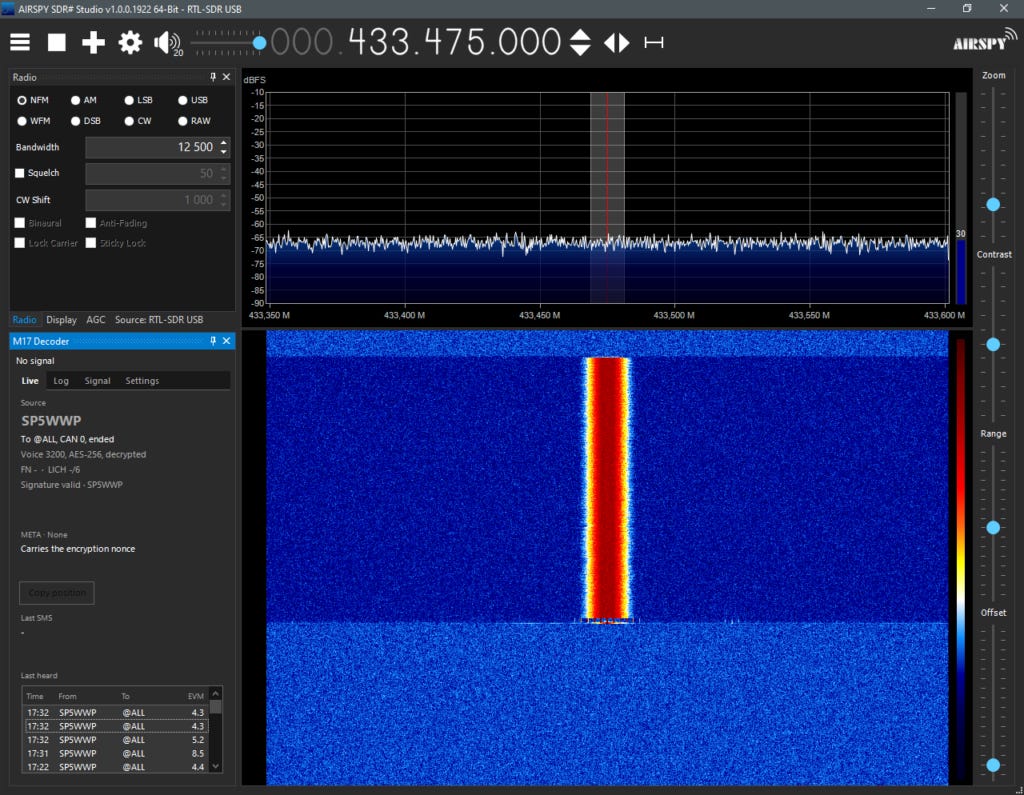
Splitting the signing process into “precompute” and “finish” was a great idea. The “precompute” step picks a random nonce, does the expensive point multiplication and computes the nonce’s inverse (using the elliptic curve). This happens when the PTT is pressed and takes roughly 30ms. When PTT is released, the “finish” function does the rest, and that part is shorter – about 2ms.
The idea of cryptographic signatures in Amateur Radio transmissions is, in my opinion, gaining momentum and SP5WWP is demonstrating that he’s a subject matter expert on it. M17 as an open source system is a perfect illustration of why open source implementations are important to encourage such experimentation.
A radio manufacturer that wants to significantly differentiate their products from “the rest of the thundering herd” of FM, DMR, D-Star, Fusion, P25, NXDN, even TETRA radios (all… yawn… what else ya’ got that’s actually interesting?) would do well to get SP5WWP onboard as a consultant to implement such a capability.
piewpiew BBS
A tiny BBS. A little corner of the internet.
No algorithms. No endless scrolling. Just people, messages and a blinking cursor.
BashBBS is a message board you visit from a terminal window. It is written in Bash and runs on a Raspberry Pi Zero W. It’s my project, my time, and it goes well with a cup of coffee. You’re welcome to pull up a chair.
I love this. There will be a Raspberry Pi online in N8GNJ / Zero Retries Lab running this on 44Net. The router in front of it (or maybe, if I can ask Claude AI the right questions, in that RPi) will restrict access to other 44Net users, and perhaps fellow AREDN and HamWAN users.
This doesn’t replace email, etc. or a Packet [Radio] BBS - that’s sufficiently specialized and standardized for forwarding that it’s a different beast. But this looks like a lot of fun.
Olimex UEXT-CH390 SPI to Ethernet module targets Raspberry Pi and ESP32 MCU boards running ESPHome
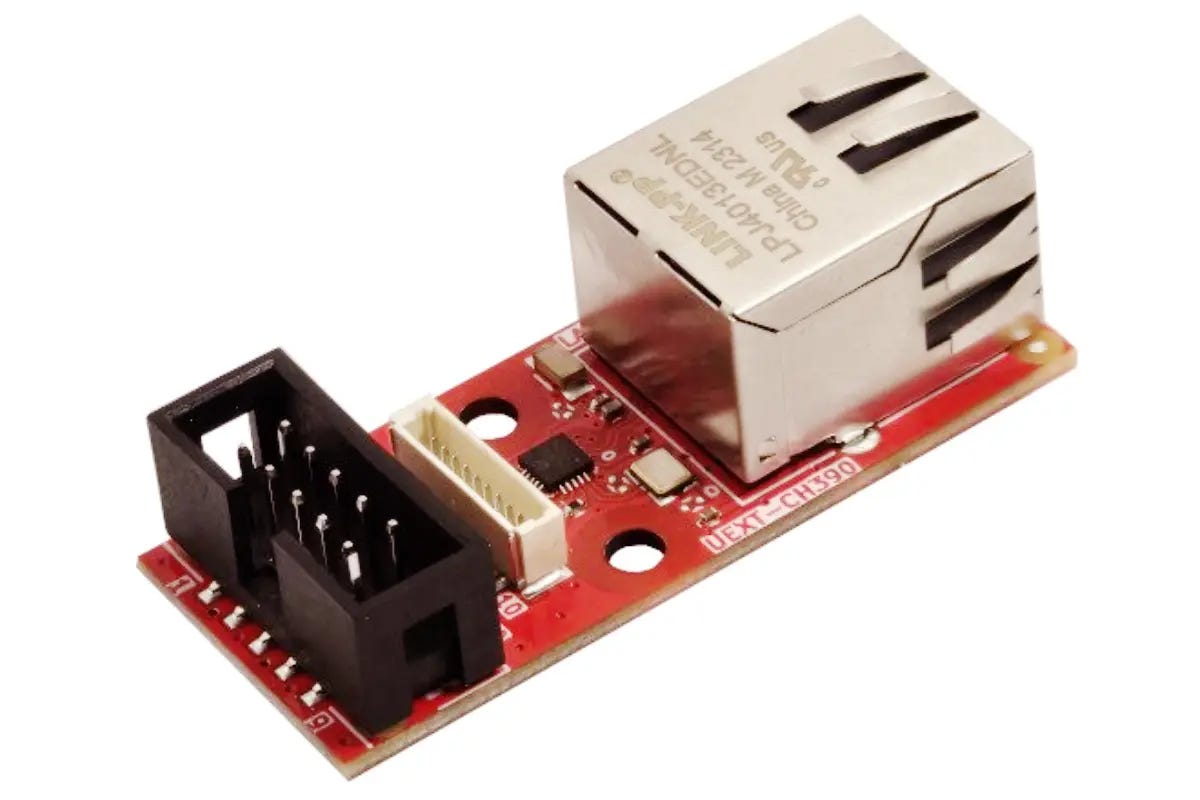
Olimex UEXT-CH390 is a small open-source hardware module that adds 10/100 Mbps wired Ethernet connectivity to microcontroller boards through an SPI interface. It is designed for Raspberry Pi Pico and Pico 2 boards, as well as ESP32-S3, C3, C5, C6, and other microcontrollers without built-in Ethernet connectivity.
…
Ethernet controller – WCH CH390 with integrated 10/100 Mbps Ethernet MAC and PHY
10BASE-T and 100BASE-TX Ethernet with auto-negotiation
Auto-MDIX support for automatic cable detection
Built-in 16KB SRAM for packet buffering
Factory-programmed MAC address, eliminating the need for an external EEPROM
IPv4/IPv6 TCP and UDP checksum generation and checking
IEEE 802.3x flow control
Host interface – SPI modes 0 and 3, with clock speeds up to 72 MHz supported by the controller
Ethernet – 10/100 Mbps RJ45 port
Expansion
10-pin UEXT connector
10-pin pUEXT connector with 1.0mm pitch
Power supply – 3.3V through the UEXT/pUEXT connector
Dimensions – 50 x 21 mm
This leaped out at me for a future fantasy evolution of an OpenTNC with Ethernet. Building a cluster of radios with such a device, 6m, 2m, 1.25m, 70cm - you just need five port Ethernet switch!
A Tiny OS For a Tiny Board
Jenny List on Hackaday:
As microcontrollers have become ever more powerful, we have started to see an increasing number of operating systems written to take advantage of this extra power. Usually they’re aimed at handheld or other similar devices with support for screens and input devices, but just what can be done if a developer eschews those niceties? KoaOS is a small OS for the ESP32-S3 on the Heltec WiFi LoRa 32 V4, and it’s headless. You can only talk to it via a serial terminal on its USB port.
What it provides is a UNIX-like shell, with editor, GPS, weather and APRS apps ready to run. It’s not just limited to those, there’s an SDK of sorts to create new apps and compile them from C. These .esp files can be installed and uninstalled at will over the network.
There are a few limitations, for example it’s only for the Heltec V4 due to a large requirement for PSRAM. We are guessing that another similar spec board could probably be made to perform, however it’s clear that hasn’t yet been done. Despite that we think this OS is interesting for concentrating on the OS rather than the interface, and we hope to see it develop further.
Several takes on an ESP32 OS have appeared in recent times, including this JavaScript one.
This was interesting when I saw it, and I almost tagged it as “interesting, but can’t fit it in” until I saw that APRS is included as a default.
An entire generation of radio experimenters is evolving that knows what APRS is… but likely no knowledge of it having evolved in, or any knowledge of Amateur Radio.
Update on xara
In my research reading for Zero Retries this past week, I haven’t seen any substantive new developments other than additional testimonials that xara is indeed interoperable with VARA (both VARA FM and VARA HF), and lots of “armchair lawyering” (opinions) about the “legitimacy” of xara… without actually resorting to analysis of the xara code which is, of course, open source and therefore available for inspection / analysis.
But… Breaking Updates on Friday 2026-11-06:
Gary Kohtala K7EK on the Bpq32 email list - XARA - A free VARA-HF compatible modem:
…
There’s a lot of discussion about XARA occurring on the internet. The legality of it has been questioned, however it seems that there is no concern. From what I’ve read, X0RRO, the author of XARA, has reportedly reached an agreement with Jose, EA5HVK, to permit his new software unchallenged. After all, everyone can run VARA-HF unregistered, with a limitation of 177 bps. If I read correctly, the same will apply to XARA. If XARA is compiled with a “registered” flag, and a valid VARA-HF registration code is applied, it was said that XARA will then be capable of the entire range of speeds, just as is VARA-HF. It seems like a peaceful co-existence has been forged.
…
I haven’t seen a confirmation of what K7EK is claiming.
…
Ben Kuhn KU0HN on the Bpq32 email list - Re: XARA - A free VARA-HF compatible modem:
…
The TL:DR here is that this is a major improvement for Linux users. Xara is significantly more efficient on Linux than VARA on Wine. I knew it would be better, but I was really surprised at just how much better it is.
Xara does have a web interface to view the waterfall and make real-time adjustments. IMO this is superior to VARA as the GUI is not required so we can run and manage xara as a proper headless service and have the GUI available to use if/when we need it from any machine with network access.
K3JSJ has a Windows port of xara here: https://k3jsj.net/xara-modem-Windows/
There is also a fork that builds for Mac, iOS, and Android here: https://nr5p.com/xara-fork.html This is a work in progress it seems, and no binaries are available but one could build from source if inclined.
IMO it’s worth trying out for anyone who doesn’t want to mess with WINE or where power budget is important.
Mac! Woo Hoo! That was fast!
…
Late on Friday after I read K7EK’s post, I reached out via email to x0rro, the creator of xara (quoted with permission):
i have not had any contact with EA5HVK to date. despite license restrictions, VARA has always been honest-ware, and in my opinion hams are an honest bunch. i hope and expect that people who choose to compile with the registered feature have purchased a license from him.
i've been working hard on libxara, and it’s coming out shortly. libxara will make it even easier to embed xara. users can depend on a stable API while receiving timely updates to the core. in the meantime, i hope people check out mercury and other free modems.
VARA product updates, 4 Nov 2026 (Vara FM v4.4.1, Vara HF v4.9.1 & others)
Chris “CJ” Patten VA3CJO on the VARA-MODEM email list:
Spotted my local AUXComm Group, VE3SMF pointed out new versions of VARA products were released yesterday, contents of that post below.
However, I’m curious why this wasn’t posted here by the author, immediately on release. New versions of VARA are few and far between - it’d call this “big news”, even if it’s a minor, maintenance release to primarily address bugs.
Updates of several Vara products were released on November 4th, 2026. They are available on the Winlink.org site for download. This is the best site to download the programs.
Ref: downloads.winlink.org - /VARA Products/
Items of interest include:
Vara Chat v1.4.3
Vara FM v4.4.1
Vara HF v4.9.1
Vara Terminal v1.2.2
There’s no information provided on what has changed in these newer versions on any of the “official” VARA download pages - winlink.org, varamodem.com, and rosmodem.wordpress.com. Nor, reportedly, is there any explanation in the changelogs of each changed app.
In case of a worst-case scenario, thank goodness for the Internet Archive, which has a snapshot of that page from 2026-07-22 with the previous versions of VARA software:
 2/14/2026  7:54 AM       758564 VARA Chat v1.4.3  setup.zip
 1/31/2026  2:27 PM      6318275 VARA FM v4.4.0 setup.zip
  1/7/2026  3:58 PM      4511767 VARA HF v4.9.0  setup.zip
  1/7/2026  3:58 PM      2345825 VARA SAT v4.4.5  setup.zip
 9/12/2025 11:21 AM       328275 VARA Terminal v1.2.2  setup.zip
With this, IA earned this month’s automatic contribution.
Using Inexpensive Portable Radios For Data Communications Experimentation
I tapped the brain trust on the Zero Retries email list this week with this query:
Thanks to David Platt AE6EO’s presentation about OpenTNC at ZRDC 2026, and the stellar productized version from Nigel Armstrong NA6D:
https://na6d.com/products/na6d-opentnc
I’ve gotten jazzed about AX.25 Packet again.
I want to put a bunch of them on the air for local experimentation in Zero Retries Labs and… what to use for radios?
I’ve got ample mobiles, but that’s way overkill for communicating within a few hundred feet. Power, dummy loads, lots of excess RF in a Faraday cage of a steel-sided / roofed workshop.
So I’m imagining using inexpensive portables (I’m mostly, for the moment, interested in protocol experiments rather than speed experiments), but batteries…
As a rule, will the portables that accept USB-C power input run on that - keep the battery charged AND operate normally?
I’m going to do the experiment with the units I have (if memory serves, the Baofeng something “Mini”), but just thought I’d run this by the brain trust here.
Or am I missing something more basic like a “data radio” that is designed for this use case?
What followed was a slew of informative and experienced responses, basically that it works OK to use an expensive portable radio on a charger, even when the charging port is on the radio’s battery.
There were some suggestions of alternatives, but for my casual experimentation requirements for getting more hands-on time with packet radio, the portables are a good (enough) solution.
Another post suggested another radio that works fine without the battery - the charging / power port isn’t on the battery. That was a great suggestion, and I’m going to make use of that if it works out to have reasonable data performance.
If you’re not on the Zero Retries email list (or following via RSS), you’re missing a great source of information.
Open-Source Guru Raymond: AI Ends Closed-Source Software
For Eric S. Raymond, the verdict is clear: closed source is nearly at its end. For the co-founder of the Open-Source Initiative and a pioneer of the open-source movement, Large Language Models are the death knell for software secrecy. He had always expected the end of closed source. But he had actually anticipated a slow erosion. And he had also expected some niches to remain – but even that is no longer the case. The controversial activist explained in an opinion piece that only patents and cloud-based software (software as a service) would still protect proprietary business models. He expects a hard collapse.
…
Legally, Raymond sees a viable path in the USA: whoever first converts a binary file into a specification and generates new code from it without looking at the decompiled code is on safe ground, similar to how Phoenix Technologies once reverse-engineered the IBM PC BIOS. With LLMs, this now only takes a day, and when distributing, it’s hardly practical to track down everyone who skips the intermediate step. He sees no loophole with patents but points to Linux’s practice of not including patent-encumbered codecs but allowing them to be loaded later. The situation is stricter in the EU. Here, the EU Software Directive essentially only allows decompilation insofar as it is necessary for interoperability with other programs – and according to an ECJ ruling from 2021, also for error correction.
Welcome to the new world of AI-enhanced software engineering in the mid-2020s and beyond. Yes, this is front-of-mind to those of us interested in Zero Retries Interesting aspects of Amateur Radio with the recent reveal of xara as an interoperable, independent Linux app that communicates with VARA.
Another aspect of this that’s front of mind of late is the increasing use of AI to find bugs in software… either to attack vulnerable software, or to patch “legacy” software against attack. Such fears are applicable to many proprietary apps in widespread use in Amateur Radio, particularly those that depend on Internet connectivity for part of their functionality.
Please direct comments / feedback about ZR > BEACON to the Zero Retries email list with the hashtag #ZR0268. Paid subscribers can comment directly on the web version of this issue.
Request To Send
By Steve Stroh N8GNJ
Editorial, Commentary, and Occasional Digressions
The Subtle, But Profound Benefit of Attending ZRDC 2026 In Person
I had a refreshing email exchange with an old friend with whom I share a history of involvement with packet radio networking. I was pointing out a couple of cool features of the OpenTNC, and that I’m working on getting one on the air with my primary shack radio to communicate with some local folks, and perhaps a larger group of packet radio users up in the Vancouver, British Columbia metro area.
My friend said:
It’s awesome that you actually have some time to sit down and work on gear! I am going to attempt some of that myself here this week and weekend hopefully.
I replied:
Between preparations for ZRDC 2026, family obligations, health issues, pushing out ZR, this, that, and the (many) other things… I haven’t been making the time to “work on gear”.
But, one of the best things about ZRDC 2026 is that it gave me a a psychic jump start to start doing so again. At ZRDC 2026, I sat there, presentation after presentation with the thought pounding through my head with increasing intensity that dammit! I’m doing something seriously wrong in my life if I’m not actually doing some enjoyable and fulfilling hands-on work with some of this amazing equipment that we have available now.
Minutes, hours, and days of lifetime, at our age, are precious. We don’t get a do-over of any of that. If we’re “doing what we’re supposed to”… too much… then we’ve only got ourselves to blame for a life of “supposed to” rather than the stuff that makes us enjoy life and glad to be alive.
Tom Salzer KJ7T of Random Wire newsletter and EtherHam finishes his weekly issues of Random Wire with this phrase:
73, and remember to touch a radio every day!
That can sound like trite advice at times when you’ve got urgent priorities in your life. But, “touching a radio every day” can keep you grounded4 and keeps the joy of radio alive when it’s otherwise easy to push it aside. After ZRDC, I’m adopting it as a mantra, as well as really trying to embrace my phrase - Weekends are for Amateur Radio.
Another realization about my particular situation is that my office and radio desk are out in N8GNJ / Zero Retries Labs which is (mostly) unheated metal sided shop, thus a little less fun to spend time in during the rainy, gloomy, colder weather. I don’t have any radio equipment in the house. But that doesn’t have to be the case, and especially with the local experimenting I want to do, using a small portable radio to “work the Lab”. That’s now nearly trivially easy with the NA6D Open TNC which has a USB-C connection for both power and comms, and a portable radio that can be recharged from USB-C.
I get chided about “Weekends are for Amateur Radio” from a long-time friend who has a young family. Thus for them, weekends are always busy with family activities. I’m doubly sensitive about that issue now that my immediate family includes an infant. But, for me, in most of my life, the only thing stopping Weekends are for Amateur Radio… is my well, Tina’s and my… choice of priorities.
TAPR Board of Directors Elections Upcoming Next Week (?)
A reminder to Zero Retries readers that I have nominated myself for a position on the TAPR Board of Directors. If elected, I hope that I can help TAPR regain some of its lost momentum and become more of an influence and enablement in Zero Retries Interesting aspects of Amateur Radio such as standards, networking, and digital communications in Amateur Radio.
If you’re a member of TAPR and a reader of Zero Retries, I would appreciate your vote in the upcoming TAPR Board of Directors election.
Per the TAPR PSR newsletter #162, October 2026:
At the time of publication, there were four nominees, whose biographies appear on the following pages. An online election will be held from November 7 to November 20, 2026, using ElectionBuddy.
I think there is was a fifth candidate who self-nominated at the recent TAPR Membership Meeting on 2026-10-24. With “more than three” nominations for three open positions, current TAPR members are likely to receive an email next week from ElectionBuddy about this election.
Whither Store & Forward Podcast?
A Zero Retries reader, and a podcast fan, asked me about the Store & Forward Podcast that Kay Savetz K6KJN and I produce. Episode 14, dated 2026-01-14 was our most “recent”.
Ouch!
By now you’ve heard that 2026 has been busy for Tina and me, and that’s part of it. Another is K6KJN has also been busy in 2026.
But we consider S&F to be on hiatus rather than dead. We’re both pretty busy in November, but we should be able to arrange a Zoom meetup in December.
Future Zero Retries Campaign - Data Radio With Flat Audio
As we wait for the arrival of the LinHT, and then variants of it such as “LinMobile”, what we increasingly need with all of these “Audio Band OFDM” modes (VARA FM / xara, Modem73, MOP is a basic “data” radio with a Flat Audio connection.
Don’t haves:
Fancy front panel / display / knobs.
Speech enhancement
Digital voice
Integrated TNC
Integrated audio interface
Perhaps not even a microphone (or even a microphone connection)
Internal speaker
Fans
DO HAVES:
Basic front panel LCD - status of power, TX, fault, etc.
Flat audio connection such as the 6-pin MiniDIN
Full remote control of parameters - channel, duplex, etc. via a standard API such as rigctrl
Big heatsink (in lieu of fans)
25 watts minimum, 50 is nice
Monoband preferred (ideally for 2m, 1.25m, and 70cm, but 2m / 70cm is acceptable
Price under $300, lower is better.
The requirement / market for such a radio is currently below the threshold of every radio manufacturer currently selling a product into the Amateur Radio market. They just don’t get it - the numbers are too small at the moment and they’re just not seeing a potential market for it.
But they will, soon enough. It’s going to be a formal Zero Retries Project in 2027 to make every major Amateur Radio radio manufacturer aware of the need and large market for this radio, citing specific projects that could use such a radio.
Weekends Are For Amateur Radio!
It’s windy and rainy here in Bellingham this weekend, but there’s plenty of exciting projects awaiting me on my not-too-cluttered workbench in N8GNJ / Zero Retries Labs. Packet Radio, here I come!
Have a great weekend, all of you co-conspirators in Zero Retries Interesting Amateur Radio activities!
Please direct comments / feedback about Request To Send to the Zero Retries email list with the hashtag #ZR0268. Paid subscribers can comment directly on the web version of this issue.
73,
Steve N8GNJ
Closing Thanks
My ongoing Thanks to:
Tina Stroh KD7WSF for, well, everything!
Jack Stroh, Late Night Assistant Editor Emeritus
Fiona and Shreky Stroh, Late Night Assistant Editors In Training
Founding Members Who Generously Support Zero Retries:
Founding Member 0000 - Steven Davidson K3FZT (Renewed 2026, 4th year!)
Founding Member 0001 - Randy Smith WU2S (Renewed 2026, 4th year!)
Founding Member 0002 - Chris Osburn KD7DVD (Renewed 2026, 4th year!)
Founding Member 0003 - Don Rotolo N2IRZ (Renewed 2026, 4th year!)
Founding Member 0004 - Bill Arcand W1WRA (Renewed 2026, 4th year!)
Founding Member 0005 - Ben Kuhn KU0HN (Renewed 2026, 4th year!)
Founding Member 0006 - Todd Willey KQ4FID (Renewed 2026, 4th year!)
Founding Member 0007 - Merik Karman VK1DF / VK2MKZ (Renewed 2026, 4th year!)
Founding Member 0008 - Prefers To Remain Anonymous 08 (Renewed 2025, 3rd year!)
Founding Member 0009 - Prefers To Remain Anonymous 19 (Renewed 2025, 2nd year!)
Founding Member 0010 - Merik Karman VK1DF / VK2MKZ (Renewed 2026, 4th year!)
Founding Member 0011 - Rick Prelinger W6XBE (Renewed 2026, 3rd year!)
Founding Member 0012 - Ryan Tolboom N2BP (Renewed 2026, 3rd year!)
Founding Member 0013 - Newton White N4EWT (Renewed 2026, 2nd year!)
Founding Member 0014 - Joe Hamelin W7COM (Renewed 2026, 2nd year!)
Founding Member 0015 - Rich Stocking N7OP (Renewed 2026, 2nd year!)
Founding Member 0016 - Chuck Hast KP4DJT (Renewed 2026, 2nd year!)
Founding Member 0017 - Phil Karn KA9Q (Renewed 2026, 2nd year!)
Founding Member 0018 - Prefers To Remain Anonymous 47 (Renewed 2026, 2nd year!)
Founding Member 0019 - Prefers To Remain Anonymous 0108 (New 2025)
Founding Member 0020 - Prefers To Remain Anonymous 110 (New 2025)
Founding Member 0021 - Prefers To Remain Anonymous 111 (New 2025)
Founding Member 0022 - Prefers To Remain Anonymous 112 (New 2025)
Founding Member 0023 - Prefers To Remain Anonymous 116 (New 2026)
Founding Member 0024 - Rob Bowser (SPOOLTENNA) (New 2026)
Founding Member 0025 - Dave Stewart K7XST (New 2026)
Founding Member 0026 - Prefers To Remain Anonymous 32 (New 2026)
Founding Member 0027 - Mitch Hamm N8XS (New 2026)
Numerous Annual and Monthly subscribers who also generously support Zero Retries financially!
You thousands of readers of Zero Retries without which there would be little point in publishing this newsletter.
The Usual Administrivia
Zero Retries About - www.zeroretries.org/about
Zero Retries Digital Conference - www.zeroretries.org/p/conference
Zero Retries (Substack Blanket) Privacy Policy - substack.com/privacy
Zero Retries Reprint / Reuse Policy - www.zeroretries.org/p/reprint-reuse
Fair Use - All excerpts from other authors or organizations, including images, are intended to be fair use and are fully attributed generally by author and link (URL).
Paid Promotional Content - Unless otherwise noted in the article or item, advertisement, or sponsorship notice, Zero Retries does not include paid promotional content. Exceptions:
Advertisements in Zero Retries,
Sponsorships in Zero Retries,
Zero Retries products,
Zero Retries events
Features and content exclusive to paid subscribers.
Zero Retries 2026 Index - www.zeroretries.org/p/index-2026
Zero Retries Archive - archive.org/details/zeroretries?sort=-date
⬅️⬅️⬅️ Previous Issue of Zero Retries | Next Issue of Zero Retries ➡️➡️➡️
Zero Retries 0268 was published on 2026-11-06. This issue was 10738 words.
Footnotes For This Issue
To see the relevant sentence for the footnote, just click the footnote number.
Yes, that cable from Kantronics is a bit pricey, and I could “easily” fabricate my own cable, ordering the pre-made cable is adds an “Amateur Time Unit” and minor friction point that can be used for “just get the unit on the air”. Not to mention that Kantronics did not charge shipping, so that’s a compensation.
Keeping data communications within a 12.5 kHz channel is the threshold of “don’t ask / don’t tell” in Amateur Radio - generally, that you don’t get bothered about such operations. While wider channels are legal (such as 100 kHz on US 222-225 MHz and 420-450 MHz bands), you start attracting attention and complaints and “That’s illegal, I’m going to report you to the FCC” silliness.
Appliance is used here as high praise! No one else has done as much as KM6LYW has done with DigiPi to lower the barrier of using data communications on Amateur Radio, and kudos to KM6LYW and DigiPi for that.
Caught the secondary meaning of that phrase during proofreading.